Tuesday, 20 October 2009

Live Mesh now syncs with Snow leopard

I saw Steve Clayton demonstrate Microsoft's Live Mesh at the Thinking Digital Conference, way back in 2008.

I realized straight away that this was going to make a huge difference to the way i worked. No longer would I need to carry around a pocket full of usb dongles containing files to transfer between laptops and machines at home and in the office, and wondering if this was the latest version. No longer would i get home, to realize i'd left the memory stick with the files i was going to on work on in the office pc.


In fact Live Mesh goes a whole lot further and allows me to take control of my remote machines and access shared files remotely via a browser.

Needless to say as soon as I got back from Thinking Digital, I went on a mission to get onto the Live Mesh beta programme, and Live Mesh has been keeping my digital life synced ever since.

That was until I updated to Mac 10.6 (snow leopard) and discovered Live Mesh was not supported on snow leopard. It would be fair to say that I was completely gutted. I wasted no time at all in emailing Steve again and asking if he'd heard whether there was a new version of Live Mesh in development, he promised to let me know as soon as he heard anything.

That was a couple of weeks ago, and true to his word, i got an email from Steve today with a link to the latest version of Live Mesh for Mac that now supports Snow Leopard.

Microsoft quite often gets a bit of bad press, but this just another example of how well their evangelist programme works, of how they're listening to their customers and how far they go to support products that are not only fantastic but also in the case to Live Mesh but also free!

Associated links: Live Mesh, Geek in Disguise blog, Snow Leopard

Sunday, 9 August 2009

Creating a cover

Apple have always been amongst the most stylish of companies producing, what must be some of the most iconic of products produced. Not surprisingly MacWorld Magazine, has had to be be equally stylish to appeal to the mac faithful. This amazing time lapse video shows the deisgn process going into producing one of their signature cover pages.

Cover creation from Peter Belanger on Vimeo.

For the more technical amongst you the for the time lapse video, they used the Canon 5D Mark II with a 24mm-70mm zoom. They choise being down to its great image quality with high ISO's. Canon's sRAW1 giving the flexibility of a RAW file with the file size of a jpeg. The actual Macworld cover was taken with a Phase One P65+ digital back attached to a 4x5 Sinar X camera with a 65mm lens.

The video was produced by Peter Belanger, the soundtrack by The Brokenmusicbox, and cover design by Rob Schultz of MacWorld Magazine.

Thursday, 4 June 2009

Searching for meaning.

If the internet were a giant book, containing all of human knowledge, it would surely have a search engine as it’s index. And what an index that would be! With the seemingly infinite variety of data and the breadth and the depth of information on the internet, an index this big would probably fill the largest of libraries, on its own.
When you think about it, the accessibility and indeed the popularity of the internet, is due of the humble search engine. I mean if it weren’t for search engines tracking all this information, finding relevant information, would be like finding a needle in a haystack.
But we’re rarely satisfied with what we have, so merely getting pages of results to our queries is no longer enough. What we want now is to get only information that is highly relevant. This is where semantic search comes in.
“Semantic” just means meaningful, how do I know? I ‘Googled’ it! So what does ‘meaningful search’ mean then? Of course it has different meanings to different people, but most people agree that it should be; a search that understand simple ‘who, how, when, where and what’ questions, and that it should be able to provide clear,simple,unambiguous answers. For example you if you typed, “how old is Harrison Ford?’, or even ‘who is bill clinton married to?’, you might get the answers like ‘66 years old’ or ‘Hillary Rodham Clinton’.
You might be surprised to learn that Google have already introduced this technology into their search engine, (if somewhat quietly). Yahoo have also been working on their own semantic technology with a project called ‘Search monkey’. The Yahoo solution works with microformats to allow site owners, designers and users to hide additional information beneath the page, making it easier for search engines to interpret the context of a page and return more relevant results. Microsoft also launched 'Bing.com' their replacement to 'live search' previously known as project ‘Kino’ and possibly including some 'Powerset' Technology.
But is searching semantically enough? After all semantic searches will still only provide information that already exists on the internet. What if we want, answers to questions, where that particular information doesn’t currently exist. To do this firstly we would need to understand the question itself, then we would need to understand the data that could use to answer the question and finally we would need to be able to calculate an appropriate answers.

You’d be forgiven therefore, if you thought that this was the stuff of science fiction, but you’d be wrong. In mid May, Stephen Wolfram released ‘Wolfram Alpha’, he describes this as a ‘computational knowledge engine’. It’s limited to mainly scientific data (in its own database) at the moment, but it could change everything.

This post text was originally wtitten for the technotes column in the journal on 4th June 2009. Many Thanks to Lewis Harrison for the editting of the final piece.

Sunday, 31 May 2009

Releasing a WAVE of new possibilities.

Google never cease to astonish me with their innovation.  In a month when 'Wolfram Alpha' and 'Microsoft Bing' filled the technology headlines, and people were talking about Twitter and the way that real time search was changing everything, they announce WAVE and completely turned the whole communication model on its head.

In typical Google style, they keep there best until last, waiting until the second day of the Google Developer Conference in the Moscone Center, San Francisco on May 27 - 28, 2009, to show us WAVE. 

So what's so good about WAVE and why did i say it will turn the communications model on its head? Up until now we have tried to imitate none-electronic world (ie the paper world) with our online communications technologies, sending - then receiving, storing documents in folders, working in structured linear patterns publishing the finished product without showing how we got there, keeping separate information in separate places, reading-writing-sharing-collaborating. All this could soon change. Wave allows us to work together in an altogether different way, working in real time to seeing content as its typed, utilizing richly formatted text, photos, videos, maps and other tools.

And its not just the way that we communicate in the sense of instant messaging and text, that is going to change its also things like blogs and websites, imaging being able to collaboratively leave comments to a blog post, where you could use text,images, movies, maps and more to make your point, or a pole where you could discuss your opinions in real time with other users, and that is only a beginning, the implications for the way we watch movies, sports or tv, or even the way that we play games or do puzzles on line could be radically different, and after a day, we haven't even started to explore the possibilities. Imagine the way that mass collaborations may work with science or the arts, the way that we conduct research or that we learn. Its like Lars and Jens Rasmussen, have opened a flood gate on web development and release a wave of new possibilities

Part of what makes what the Google Wave team have done special, is that its all open source, and its all possible in the browser (yes its html 5 so you will need a modern browser, but one the whole it doesn't need any special add ins). So we're likely to see the technology being pushed to all sorts of extremes with developers coming up with all sorts of clever and innovative ways to utilize this technology, in other words we ain't seen nothin yet!

Google have always been great innovators, but they've never been satisfied with that, they seem determined to rewrite every rules and make us rethink everything we thought we knew. 

Related posts: Google WAVEWill google wave goodbye to twitter?

Wednesday, 15 April 2009

5 things to do if you didn't get Thinking Digital tickets!

Its hard to believe that this years Thinking Digital Conference is now less than a month away. The event, now in its 4th year, is rapidly shaping up to be amongst the best tech conferences around, not only nationally but internationally. One of the things that really stands out for me is how much the speakers themselves seem to enjoy the event.


Not surprisingly the tickets sold out pretty quickly. So as Herb Kim and and his team, put the final touches together, what can you do if you didn't manage to get a ticket, here are my top 5 suggestions;

1. Come to Newcastle anyway and hang around hotel bars hoping to bump into the speakers, although you may have to watch out for hotel security throwing you out.
2. Get yourself on Amazon and order copies of the speakers books and start speed reading.
3. Watch some of last years talks on youtube and hope that nothings changed in the past 12 months.
4. Follow the blogs and tweets from the event, wishing that you'd found a way to get a ticket.
5. Send a strongly worded email to the boss asking why you're not there and demanding a ticket for next years event.

In all seriousness the Thinking Digital Conference is amongst the best conferences around, and i'm sure that those of you that did manage to get tickets will have a great time, meet lots of fantastic people and go home with a head full of great ideas and enthusiasm. If you really haven't been lucky enough to get tickets for this years event and would like to attend i believe there is a reserve list (although i have no idea how long it is) and there is always next year.


Wednesday, 1 April 2009

CloudCamp North-East England

Newcastle University's Beehive building played host to the first UK Cloudcamp outside on London on Tuesday 24th March. Officially an unconference, entry was free and anyone that wanted to speak had an opportunity to take a slot, it also followed the great tradition of Barcamps with free beer and pizza and plenty of time for networking. A little more structured than a typical unconference, starting with a series of lightening talks and moving on to a panel discussion.

some of the 80 People that attended
After a brief introduction Justin Souter kicked off the lighting talks with 'an introduction to cloud computing', Steve Tron of Knowledge IT talked about 'public and fedorated clouds', Tony Lucas, CEO of XCalibre talked about 'whether there is a need for private clouds', Chris Purrington from CohesiveFT covered 'taking control in the cloud', Arvid Fossen of Aserver went on to talk about 'ready to use clouds',
Ross Cooney, founder of EmailCloud did a spot titled ‘bootstrap and transition, cloud computing to get your business started’, Alex Heneveld, CTO of CloudSoft covered 'cloud routemaster’, while Steve Caughey, CEO of Arjuna took ‘how to obtain Quality Of Service from a cloud?’ leaving Duncan Malcolm of EveryCity talking 'cloud1 versus cloud2' and Stewart Townsend from SUN rounded off the lightening talks.

The lightening talks were followed by a lively panel discussion chaired by Ross Cooney, where the 80 or so delegates got to pick the brains of the panel. The discussion covering everything from standards and data portability, to how do you tell your IT team that their jobs no longer exist and questions like how do businesses cope with a utility billing approach to cost and what happens if your provider goes bust.

All in all, it was very successful evening and I know I had a great time and learned a lot. While I found all of it interesting Ross's talk was one of the most compelling. Ross's company, Rozmic is relatively small, a handful of employees providing services for email and messaging, in a traditional model they would have a large building housing enough servers to cope with maximum usage (117 servers), a team of engineers, a huge internet pipe and power facilities. This would have had to be purchased and set up, and the maintenace and upkeep would be quite a task. With cloud computing he's paying per server, per hour and automatically turning it off and on as required, so during the night when demand is low he's only paying for 1 or 2 machines, during the day as demand goes up, he maintains performance by turning on more servers. He's only paying for what he uses and paying as he goes, so cash flow is managable and as the servers are virtual maintenace is minimal, giving his engineers time to streamline the code and make it even more efficient. What this means is, he can afford to use the technology he wants to use and can grow his business, without large risky upfront investments.

Having thought about it since i'm still not sure that I fully understand the implications of moving your IT into the cloud. Here are a few of the things that occured to me:

If you are deploying all your data to the cloud, and spinning up server instances all over the place, how does this affect the networking model? i.e. are you still using active directory to control your users, computers, sites and services? And where does anti virus and maleware fit in? Then, there is the whole area of licencing, if your creating hundreds of new servers on the fly how are they being licensed does it still use the per seat or per server approach, even if your not using microsoft servers and services surely there'll be licenses for anti virus, back up etc.

When we talk about "the cloud" are we talking about a single cloud or many fluffy little clouds, ie would i use amazon to store my files and cloudmail to provide my email and someone else to supply my sql and someone else for my cms and if this is the case how do i back all of this up, do i have lots and lots of little back up all over this cloud.

And the final thing to leave you with is do we have enough people with the skills to do all this? As an IT manager of some years, i have a very good understanding of core It, backup, disaster recovery, and a little knowledge of Api's and web development,but i'm not entirely sure that most IT staff would have all of the skills required to do all of the tricky bits to make this seemless to their end users, and i don't think many sme's could afford to get an engineer in every time it needs a tweek.

Resources: Introduction to cloud computing by Souter Consulting, Justin's blog post (with transcripts of the questions and answers), Ross's blog post, David coxon's photos.

Sunday, 8 March 2009

What's after Web 2.0?

Throughout January and February Justin Souter has published a guide to Web 2.0 on b.daily, explaining - what, where, when, why, how and who's. Justin Asked me to take a look and give him some feedback, and I want to expand upon it and take a look at what the future might include.

Web 2.0 marked a paradigm shift in the internet: technological advances converged, and coincided with a fall in costs and a change in public attitudes that is not going to happen again for a while.

What we are far more likely to see in the future are faster, smaller changes in the way that we view and use the internet (and technology in general).

This trend is, in part, because of Web 2.0. Developers have become used to leveraging user generated content created in small, loosely connected pockets all over the internet and users are demanding sites and services that can react quickly to their changing needs.

With companies like Google, Facebook and Twitter opening up access to their services, it's becoming increasingly possible for bedroom developers to make, market and sell viable products online. It's likely that this means more mobile web. Already in Africa, Asia and other parts of the world there are more mobile users than desktop users. It's likely to mean more internet-enabled devices (cameras, TVs, watches, cars, household items, fridges, game consoles, electronic photo frames, even houses themselves).

It's likely to mean more unified communications (intelligently mixing and matching email, messaging, chat, mobiles and landlines). It's likely that the environment and green computing will continue to grow in importance and that cloud computing and virtualisation will be huge. We're almost certainly likely to see more social networking, and in particular growing internet global communities (I network with as many people internationally as I do locally already).

I couldn't finish without mentioning search, and the quest for semantic (clever) search engines. Google are obviously the clear market leader, but we are also seeing a move towards searching things like twitter and social bookmarking sites, and wanting more graphical search results.

We've been talking about the future though, and these are only my ideas on what may be coming. I'd really love is to hear your ideas on this and on what you think is going to be the next big thing, or just as importantly what's not. So please leave a comment.

Saturday, 28 February 2009

Blogger rating

In addition to this blog I also write a "World of IT" blog over on Wordpress. I really only set the two blogs up originally to play with how the technology worked, so that I could offer better support in my day job.


I decided pretty early on to user blogger for nicer side of IT reviewing new software and services while I use Worldpress to have a rant and discuss the darker side of IT the dangers and the nightmares. This worked quite well because I could play with different writing styles on the two blog and last year I had the honor of being asked to write a couple of pieces for the local Paper, which was great as I got to work with a guy called Lewis Harrison, who did a great job of polishing up some of the wotk that I produced, and obviously some of his skills must have rubbed off, because bogger.com have rated worldofit with a 8.3 rating putting it up in the top 10 technology blogs.

Friday, 6 February 2009

Mac: the life

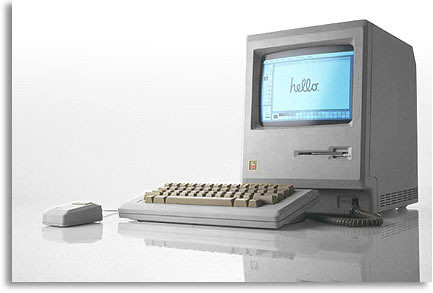
APPLE launched the Macintosh 128k (the first Mac) just over 25 years ago, with one of the greatest TV ads ever. Aired only once during the super bowl, “1984” was directed by Ridley Scott, fresh from his Bladerunner success.


At a time when computing was dominated by huge mainframe computers and command line driven business machines, Apple asked consumers to ‘Say hello to Mac”, offering the first personal computer to come with a single button mouse and a graphical interface that changed the face of modern computing forever.

Despite this, it hasn’t always been plain sailing for the Mac. Initial sales were poor due to a lack of available software, and there was a lot of in-fighting between the Macintosh team, eventually leading to chief exec Steve Jobs being forced out in 1985.

He returned in 1997 after a succession of failures, losses and CEOs, and managed to completely revitalise Apple's fortunes within a few years.

Upon his return, Jobs brought in a new generation of operating system and promoted Jonathan Ive to senior vice president of industrial design, a move which proved hugely important. Ive redefined the look and feel of the Mac, introducing colour and spelling the end of the beige box.

Another thing that's worked in Apple's favour has been the loyalty of its fans. Many people described their first experiences with a Macintosh in an almost religious way, and Macintosh User Groups popped up all over the place.

The annual ‘Mac World’ conference in San Francisco has also helped. Founded by David Bunnell in January '85, Mac World has been an influential stage for keynote speeches announcing new Macintosh products and services.

By rights, Apple should be celebrating the 25th birthday of its flagship computers. After all, few computers have stood the test of time quite so well. Oddly, though, they have chosen not to celebrate the occasion at all, surprising their fans, and opening up questions about the future of the machine.

So, what does the future hold for the Mac? On the one hand, they're becoming more and more popular for home and small business users thanks to their good looks and ease-of-use.

But on the other, Apple are concentrating more and more on collaborative technologies now, and this year's announcement that they'll no longer present at Mac World has given rise to concerns they're starting to alienate the Mac faithful.

Considering how important these people have been in the history of the firm, I can't help but wonder if Apple's apparent lack of concern for them will prove harmful.

They are the people who said hello to Mac. Is it really a wise move to risk that they'll say goodbye?

Tuesday, 2 December 2008

Pownce to shutdown

Social networking site Pownce is to shutdown on the 15th December 2008.

According to their blog, pownce have already stopped accepting new users requests and as of the 15th December will be shutting down their service altogether. To ease migration the pownce team have created an export tool to help users move their posts to other blogging services like VOX, Typepad or wordpress. Pownce have said that they will soon be emailing pro members with further details of what will be happening with their accounts.

Pownce founders Leah Culver and Mike Malone have been taken on by Six Apart, the company behind such blogging software as Movable Type, TypePad and Vox.

Is this the just another start up that failed to get off the ground, an indication that there isn't currently room in the maket room for the vast number of social networking sites and services or the first signs of the credit crunch hitting tech industries. Whatever the reason, its a shame to see them go, they have built up quite a community and its always a shame to see communities collapse (whether in the real world or online).

Many thanks for the time and effort you put into the project guys, it was great while it lasted.

Sunday, 16 November 2008

SunderlandCommunityCamp

Earlier this year I blogged about going to Barcamp North East. This was a stark contrast to the codeworks thinking digital conference, earlier the same week.

Barcamps sometimes refered to as unconferences tend to be the habitat of the stereotypically geek. There is no set itinerary in advance of the event, there is no charge for the event, everyone is encouraged to join in, and everyone has to contribute something to the event.

One of the great things i found about barcamp was that they are all about sharing, sharing ideas, sharing knowledge, sharing experiences even sharing equipment. No matter what your background, what your age, what your sex, what your experience or what your position in your day job. Everyone is equal at bar camp.

One of the most unfortunate parts of barcamp is that at the moment it is still a bit of an underground movement, widely heard of in the techie community, but less well known to the rest of society. The are also a hardcore of barcampers that travel great distances to attend as many barcamps as they can afford to get to.

So what is so special about this event in Sunderland? Well firstly it isn't a bar camp as we know it. It is in the bar camp tradition of being free, not having a predetermined speaker list or itinerary, but it differs in the way that its been promoted, there is no wiki, its not stricktly first come first served, certain groups and individuals are being specifically invited. But the reason for this is quite a good one. This event is not just aimed at the geeks among us, its aimed a getting a perfect balance between local community groups, local geeks and local councils, and to encourage them to learn from each others expertize.

Social networks are springing up all over on the internet, and while these groups have the technology to enable people to share and communicate they often don't understand how to build and sustain a strong community environment. Similarly local community groups often know all about their local communities and how to organize local services, activities and events, but are quite often lacking the technical know how to take that to the next level reaching to larger audiences and providing extended services via the internet. Local councils quite often want to help these groups and have the technology infrastructure in place to provide all sorts of assistance but without those groups providing them with the intormation they need, they are unable to help.

This community camp in Sunderland, is one of the first
i have heard of, of its kind, and there are very high hopes for the event, not is it taking some of the barcamp philosophy to the masses, but its doing it in a very specific environment, where with a bit of luck there can be some very tangible benefits.

Sunderland is a city that has a very strong industrial history in shipbuilding and coal mining, so while there has always been a strong community feel, its maybe not the place that springs to mind when you think of cutting edge technology, but maybe that is about to change.

Tara Hunt one of the original barcamp founders said that this kind of event that she likes best, where is its not just 'geeks' but also members of the local community, she also said that these sort of events are really hard work but that they can be really rewarding.

Sunday, 2 November 2008

Scour pays users for what they already do, search!

Scour say their purpose is to "bridge the gap between searchers and relevant results". Results from the 3 largest search engines, Google, Yahoo and MSN Live are agregated, in a rather slick interface, showing a summary of the page alongside which engines have indexed the result and how they have ranked the page. It also provides a platform for the user to vote and comment on relevancy, searchers connect with one another creating a social search community.
Unlike some of the other search engines that combine alogrithyms with user rating, the interface is extremely simple there is a thumbs up or a thumbs down for each result and an option to add a comment.

Founded in 2007, Scour was originally known as Aftervote.com, a 1 year later, it was acquired by Internext media, owner of the ABCSearch Network and re-branded as Scour.com

So, how does the paying users to search thing work? Well it appears to be quite simple, you get 1 point, for each serach, vote or comment you add, and you get 25% of the points of anyone you introduced to scour. There are also a few bonuses, for thins like downloading the toolbar or inviting friends. Once you aggregate 6,500 points you can cash them out for a $25 Visa gift card, which you can spend on whatever you want.

Earn money with Scour!

To get started simply click on the link above, set up an account and start searching.

My guess is this will be a bit like airmiles, in that while many of us will collect the points not many of us will ever make enough point to cash them in, and i'm not sure i really want to add another tool bar to my browser. Having said that the interface is quite clean and easy to use, and i do quite a lot of searching, so i might just give it a go.

Wednesday, 29 October 2008

Flocks RSS Feed Folders

At long last I have started updating my website and my world of it blog, which are both well overdue a face lift and a bit of fresh content. As part of the process of deciding what I wanted to do with these spaces, I've been looking at lots of other interesting blogs and
website. Anyway, I decided pretty early on that I might as well add the rss feeds of the ones I found useful to the feeds tab in my browser as i went along. Pretty soon i'd got quite a selection, so I thought i'd better organised into folders to make finding them for a bit easier in the future.

Quite serendipitously, i discovered that flock deals with rss feeds in a really lovely way. If you have a number of feeds organised into a folder, it aggregates them for you. So when you click on a folder, you see all the entries from all of the sources within it sorted by date/time. This makes it really simple to see whats going on within that whole area, of course if you are interested in a specific feed, go can click on that particular feed and get just the data from that feed.

This may seem a really small thing, but like they say small things, please tiny minds, and i guess given the amount of time we all spend online these days, your choice of browser is a pretty personal thing. As far as i can tell explorer, firefox don't do this.

Saturday, 11 October 2008

Introducing the Recommendation Engine

One of the problems with the internet has been that there is so much information out there, and so much being added every second, that its not possible to keep up. So how to you see through all this clutter to the information that matters to you?

Well, the answer is that you use social bookmarking sites like ma.gnolia or del.icio.us or content sharing and discovery site like stumbleupon, digg or mixx. These work by allowing you to see what information other people are looking at, or finding interesting. In effect its like a giant popularity contest the more people recommending a link the more likely it is to be displayed on the main page. Recently Yahoo introduced 'buzz' combining their search analytics with user recommendation.


In recent years there have been all sorts of interesting improvements to social discovery, in terms of the ways that information is displayed digglabs coming up with the stack, swarm, bigspy and arc and most recently pics options. While these are all really fun, they are still more entertaining than labour saving. Sure splitting the information into groups is useful, but its still not accurate enough to make it really useful.

I spend most of my day connected to the internet in one way or another, so its no surprise I have tried most of the social bookmarking and content sharing sites, and one of the things that i have always wished for, was the ability to submit a url to a site and have the site come back with recommendations on related information that i might find useful.


It would seem that this request was at last been answered, Digg.com just launched a Beta of a service they are calling the recommentaion engine. The recommendation engine works in a quite complex way cross referencing what it knows about you, with what it knows about people with similar tastes to you, and what it knows about the url you submitted to come up with links to relevant information.


Flickr Update Home Page

Ahead of the role out of its new look home page to all users, flickr are offering users to option to opt into the new look design. The new layout is not to dis-similar to the original design, in fact i had to look several times before i could see where the changes were. Some elements have been move around a little, there is a great new stats option (bit more about that in a moment), there is an option to toggle between recent updates and recent activity and there are a couple of sections that display a random sections, so sometimes you'll see group images and othertimes interesting images from the last 7 days etc.

The biggest change that i found was the addition of the stats section, this shows a small graph of the hits to your site on the home page, when you click on the link you'll get an array of stats ranging from a graph of hits per day, to summary of how many images, sets and collections you have, where links came from, which are most popular and how many images have been favourited or are yet to be viewed. All of which I actually found very revealing.

In my opinion while the changes have been nicely done. Because on the surface they appear to be slight, you retain familiarity with the page, but what they have changed has add a great deal to to
the functionality of the page, putting even more information at your fingertips.


Thursday, 9 October 2008

Facebook and Live Search


Facebook this week teamed up with Microsoft Live Search, to provide an internet search facility within the facebook platform. The search facility has been in the header since the introduction of the new look layout a couple of months ago, but previously only returned results from the facebook site, friend, group or application information that kind of thing.


Most browsers now have search bars these days, and many sites have a search the internet box somewhere, so why its not exactly heartstopping news. In fact Facebook didn't even make a big this of its introduction, so why have i bothered to blog about it? Well... there were 2 things that interested me, firstly its interesting that facebook chose to go with microsoft, not google when it came to search technology, and secondly was that fact that they chose to provide the results in there standard facebook formating. The implication being that facebook is becoming so large and portal like, that some of its users are more comfortable with their formating than they are with the standard google or msn search pages. In some ways reminiscent of the way AOL presented the internet in the 90's.

I have to admit that i wasn't a fan of the new facebook layout when it came out and I'm not convinced that this is a feature that i'm going to use. But I am beginning to see where they are going with the new layout and little by little, its becoming more usable.


Friday, 5 September 2008

Picasa Introduce Facial Recognition

In contrast to hype surrounding of the launch of Crome, Google’s new web browser, Picasa web album another of the Google family, very quietly launched an interesting technology of their own, this week.


The new Picasa technology, referred to as ‘name tagging’, takes some of the pain out of adding tags relating to the identity of individuals in your photographs. If you share photos on the internet, you’ll be used to adding tags (or keywords) to your images. Tags help you find your images within sets or collections on your site and allow search engines to catalogue them effectively.


One of the best things about the new name tagging technology is that it sits very comfortably with the old site, a new button has appeared giving you the option to add name tags. There is no need to reload images that you have already uploaded.

The name tagging process, automatically identifies what it thinks are faces within your images, it then asks you to put names those faces. Once you have named a person a couple of times, it will learn to identify that person for you and automatically tag them for you in future uploads.

To make tagging easier, Picasa automatically links to your gmail contacts and predicatively tries to fill names for you as you type. Another technology enhancement also allows “geo tagging” or adding geographical data to shots, by allowing you to drag and drop images to Google maps.
The application works best with higher resolution images and images that are taken from a similar angle to shots its already seen, and in some cases will ask you to confirm the identity of a person that it does not recognise.

Of course, you have the option to keep images private or to share them, but being a Google related technology, if you choose to share your images they will very quickly be picked up in Google searches, and if you are using the Google labs advanced search tools, the location will be picked up by the geographical filtering.

Picasa has been around for a while, but its always been overshadowed by yahoo’s flickr. Will this sort of advancement in technology be enough to tip the balance in Picasa favour.

Tuesday, 2 September 2008

Google Crome Goes Beta

Google Launched Chrome, their new browser in a slightly unusual way this morning (02 Sept 08), sending a cartoon strip (drawn by Scott McCloud) to google based blog site blogoscoped. They later said that this was an error and that the comic should not have been sent out prior to the launch. The 38 page comic explained how browsing the internet was changing, the technology behind their new browser, why they had built it from scratch and what it meant to the user. This was not only a very creative approach to explaining very complex technology, but a very effective one.

The Beta which is available for download now, is limited to the pc platform at this time (mac and linux versions promised to follow shortly).The Beta launched in 100 counties simultaneously, and is available to all users, rather than being invite only or users having to sign up to a waiting list.

Google's website states 'Chrome is a browser that combines a minimal design with sophisticated technology to make the web faster, safer, and easier' .

Sundar Pinchai, VP Product Management, and Linus Upson, Engineering Director say on their blog "all of us at Google spend much of our time working inside a browser. We search, chat, email and collaborate in a browser. And in our spare time, we shop, bank, read news and keep in touch with friends - all using a browser. Because we spend so much time online, we began seriously thinking about what kind of browser could exist if we started from scratch and built on the best elements out there. We realized that the web had evolved from mainly simple text pages to rich, interactive applications and that we needed to completely rethink the browser. What we really needed was not just a browser, but also a modern platform for web pages and applications, and that's what we set out to build."

Many google watchers have been speculating that google would introducing a browser for some time, building on their knowledge of the search engine industry and web aps. Initial response to the release has been good, with many key bloggers and technologists giving it great reviews already. My experience has been that the beta seems to be not only stable, but very fast.

Some of the key features are; the One box for everything, essentially the search bar and address bar have been combined so you can enter a url or a search term into the same box. They have managed to make this simple and intuitive, in a very elegant way, using colour and shade, so that while the whole url is displayed the root part of the url stands out, so you know exactly where you are.

Crash control, these days tabbed browsing is pretty much the norm, but the more tabs you have open the more chance that one tab will freeze, and usually when that happens the whole browser freezes, but chrome operates each process in its own memory, and offers a task manager like control over these processes.

Incognito Mode, sometimes you may not want to have your browsing saved in the browser history, or to have store cookies stored (for example if you have a family computer and want to purchase a surprise gift for your wife online without her knowing) but you may not want to delete your whole history or all your cookies. Incognito mode allows you to easily switch between privacy levels.

Open source, the code for chrome is available to developers, so they can write their own plug-ins and add-on, increasing the functionality of the platform.

So i guess the big question is will i be switching to chrome? While i would love to answer that with a simple yes, i'm going to have to answer with "its complicated!". For a start i do some of my work on a mac, so i can switch quite yet, also by favourite plug in's are not yet available for chrome, and it doesn't have the functionality of flock for social networking, or run some of the new microsoft products like live mesh or photosynth. So while i'll certainly be doing some of my browsing (especially when doing research online) i won't be using it for everything just yet!

Monday, 1 September 2008

Live Mesh Tech Preview

Following a successful but limited trial (tech preview) , Microsoft have extended Live Mesh to a wider trial, removing the waiting list for US and UK trial user .
Live mesh allows users to create a mesh (or collection of devices) and then synchronize folders across all (or selected) devices. Ensuring that you always have the latest version of a file or folder wherever you connect. At the moment live mesh only supports xp/vista based devices, (mac and mobile devices are planned). The mac client in particular is rumored to very close to completion, one rumor goes as far as saying that a version was recently posted on the Microsoft website, but later removed.

Live desktop is a web based interface that allows you to access your (synchronized) shared files and folders over the internet. You can choose to keep these private or share them with friends. Live desktop also shows you a list of your devices indicating which are currently online, and giving you the ability to remotely control those devices.

Both Live Mesh and Live Desktop are based around not only synchronizations but also security,
and as part of the Microsoft live family integrates with existing Microsoft live accounts.

For those of us with growing number of devices and personal networks or small businesses's its the ideal way to keep you at the centre of your digital world and ensure that the information that matters to you is seamlessly and consistently up to date wherever you happen to be.


I saw this technology demo'ed by Steve Clayton of Microsoft at thinking digital, back in May
and it look fantastic. The tech preview has certainly been no less impressive.

For those of us with both macs and pcs or even just a desktops , laptop and a mobile, it will certainly take the pain out of keeping versions of files consistent across those devices. Add to that the fact that you can remotely take a file from your camera in the office, sync it to your home pc, then remotely control the home pc to push it to a wireless photo frame in your living room, and you'll get an idea of the power of the mesh.

But i can't help wondering if this is all coming a little late. I'm already using on line services for my email, contacts, calendars, bookmarking, and file sharing, this allow me to keep my files online, so they are always up to date and available wherever i connect . So the question for me is, how much of a benefit is it to have this all in one place? and does that merit persuading all my friends that share this data to move from those services that where already using to live mesh?

Tuesday, 26 August 2008

User generated mash-ups in the Browser?

Since the term web 2.0 was coined by tim o'rielly, we've become more and more used to the idea of mash ups. Up until know though, mash ups were mainly thought as a server side technology. The web developer would write the code into the page and the user would see the results. However Aka Raskin and the guys over at Mozilla labs have applied the same logic to the browser itself, allowing the user to write a mash up, in simple language, in the browser as they go.

Ubiquity, is a firefox plug its available for download now, from the mozilla labs site. The developers describe Ubiquity as "an experiment into connecting the Web with language, in an attempt to find new user interfaces that could make it possible for everyone to do common Web tasks more quickly and easily. "


Ubiquity for Firefox from Aza Raskin on Vimeo.